Image Carousel
Image Carousel features multiple images in a rotating display, enhancing visual engagement.
Definition
An Image Carousel is a rotating display of images that can be featured prominently on a page. It allows users to cycle through multiple images, either automatically or manually, enhancing visual engagement.
Specifications and Usage
When to Use:
-
To showcase multiple images in a dynamic, rotating format.
-
To highlight featured content or announcements prominently on a page.
Specifications:
-
Image Dimensions: Each image should be 800 x 400 pixels at 72 dpi.
-
Image Format: Use high-quality JPEG or PNG files.
-
Carousel Height: Set a consistent height to ensure uniformity across images.
-
Rotation Interval: Define the time between slide transitions; set to "No Automatic Cycling" to disable auto-rotation.
-
Image Upload: Add one image at a time using the file browser.
How to create an Image Carousel
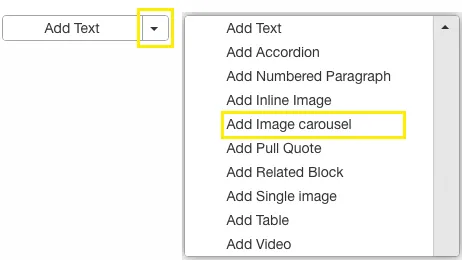
Access the Carousel Feature:
- While editing a page, select the option to add an Image Carousel.
Upload Images:
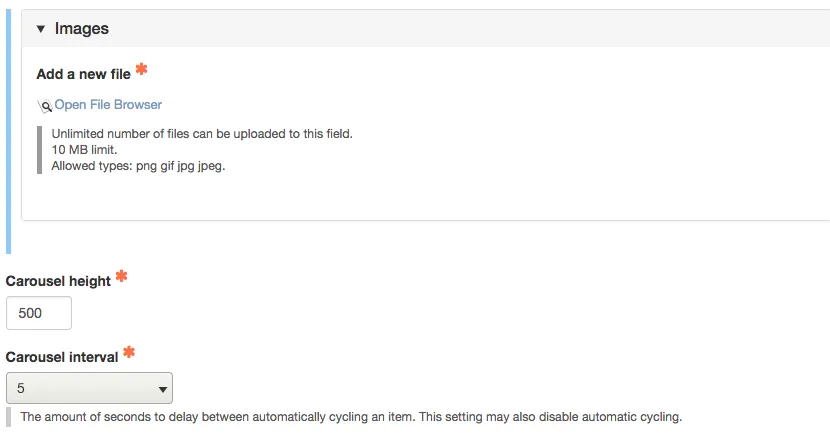
- Click to add an image.
- Use the file browser to upload and select your image.
- Repeat the process to add additional images, one at a time.
Crop Images (If Necessary):
- After uploading, crop the image if needed
- For best results, crop all images to the same dimensions prior to uploading them to your site for use in the carousel. This guarantees consistent image display within the carousel.
Set Carousel Height:
- Define the height for the carousel.
Configure Rotation Interval:
- Set the time interval between slide transitions.
- To disable automatic rotation, select "No Automatic Cycling."
Save